How people opt in
Two groups receive messages · both agree before anything is sent
Messages are sent by Heartbeat Safety, a DBA of That's the Spot Productions LLC from (855) 552-1188 · support@heartbeat.pet
What the service is
A user in hospital for four days recovers. Their pets do not. Heartbeat is a personal-safety check-in service for people who live alone with animals, and it tries to close that gap: users confirm they are okay within a window they set, and if they stop, we tell the emergency contacts they chose, so someone can go and care for their pets.
Two groups receive messages, and they consent differently. Users agree in the app when they sign up. Emergency contacts are not our users, and we never send them the first message — they agree by texting us, from their own handset, after reading what agreeing means. Nothing here is marketing, and there is no third group.
Users, who agree at sign-up
The sign-up screen is where somebody hands us a mobile number, and it says on that screen what Heartbeat will send them, that it is never marketing, that it can be turned off, and that message and data rates may apply. This is that screen:
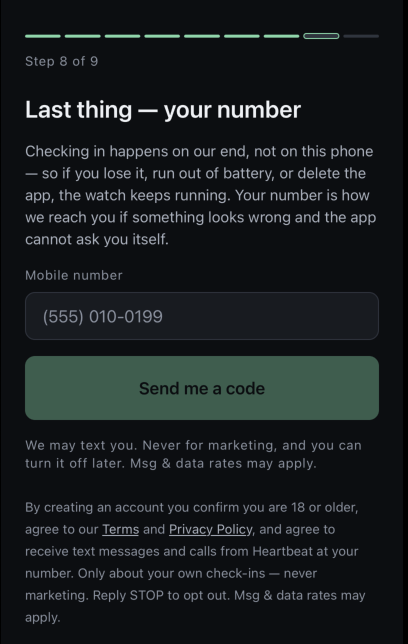
Two things go to that number: the code that verifies it, and reminders when a check-in window is closing — the second of which looks like this.
Heartbeat: No check-in from you in about 24 hours. Reply "IM OKAY" to check in. If we do not hear from you in the next 24 hours, we will contact your emergency contacts. Reply HELP for help, STOP to opt out. Msg & data rates may apply.
It is answerable without opening anything, which is the point of sending it: the person it is most useful to is the one whose phone is not showing them notifications. STOP ends it, and the app keeps working without it.
Emergency contacts, who agree by texting us
We never send the first message. There is no path in this product by which a person who has not contacted us receives anything from us.
Two channels, two separate consents. A user gives us a contact’s email address and their mobile number, and neither one agrees for the other — for the same contact, listed by the same user, on the same day. The address is proved by an invitation we send to it and a link only that inbox received, which is the one automated message in this flow and is subject to ordinary spam filtering. The number is proved only by an inbound text from that handset carrying the six digits below. So a contact confirmed by email is emailed and never texted, and nothing about an opened email is treated as permission to message a phone. The steps that follow are the number’s.
1 — the user asks, from their own number
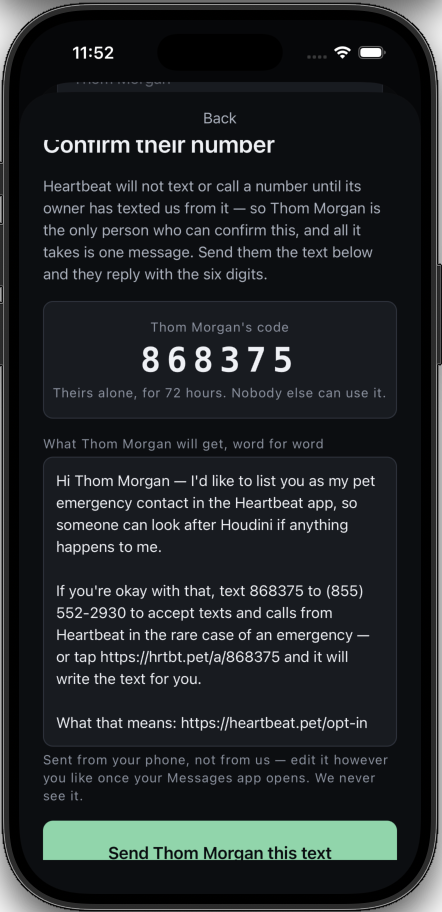
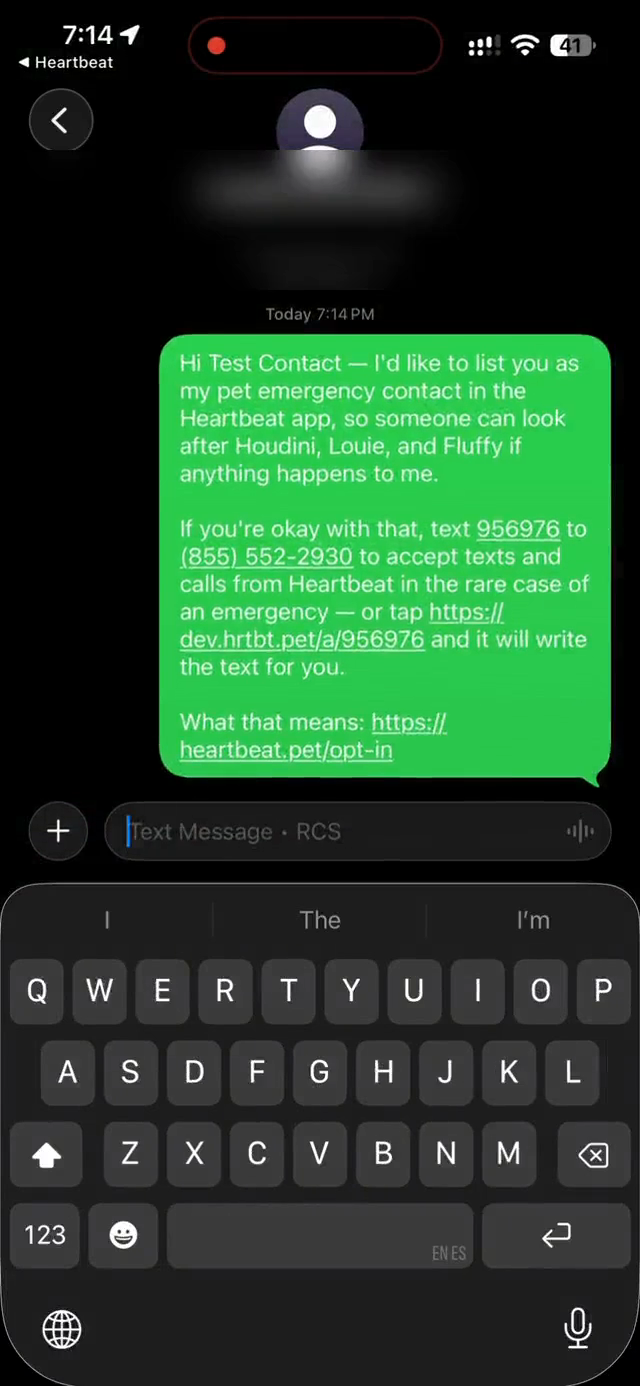
The app composes a draft and hands it to the user’s own messaging app. They send it themselves, from their own handset, after a conversation. We are not party to it and never see it. It names what is being asked, the six digits that agree to it, and where the policy is written:
Hi — I’d like to list you as my pet emergency contact in the Heartbeat app, so someone can look after Houdini if anything happens to me. If you’re okay with that, text 123456 to (855) 552-1188 to accept texts and calls from Heartbeat in the rare case of an emergency — or tap https://hrtbt.pet/a/123456 and it will write the text for you.
What that means: https://heartbeat.pet/opt-in
It is a draft rather than a script — a favour being asked between two people who know each other lands better in their own words, so they can edit every line of it. Which is exactly why it is not where the disclosure lives: see step 3.
2 — the contact texts six digits to us
Texting those digits to (855) 552-1188 is the opt-in, and it is the first message in the thread. Two things make it proof rather than a formality:
- It comes from their handset. The user has the digits too, so anything a browser could do would record consent from whoever was holding it — most likely the person doing the asking. A text cannot be sent from a phone somebody does not have, and digits arriving from any other number are refused.
- The digits name one user. Two people can list the same neighbor without either knowing. A word could not say which of them was being agreed to; six digits can, so somebody asked twice accepts each separately and neither by accident.
The link writes the text; it does not send it. It opens their own messaging app addressed to us with the code already in it, and they press send — so the consent is the same inbound message either way, from the handset being added. There is no button anywhere that agrees on somebody’s behalf, which is the one thing the account holder must not be able to do: they have those digits too.
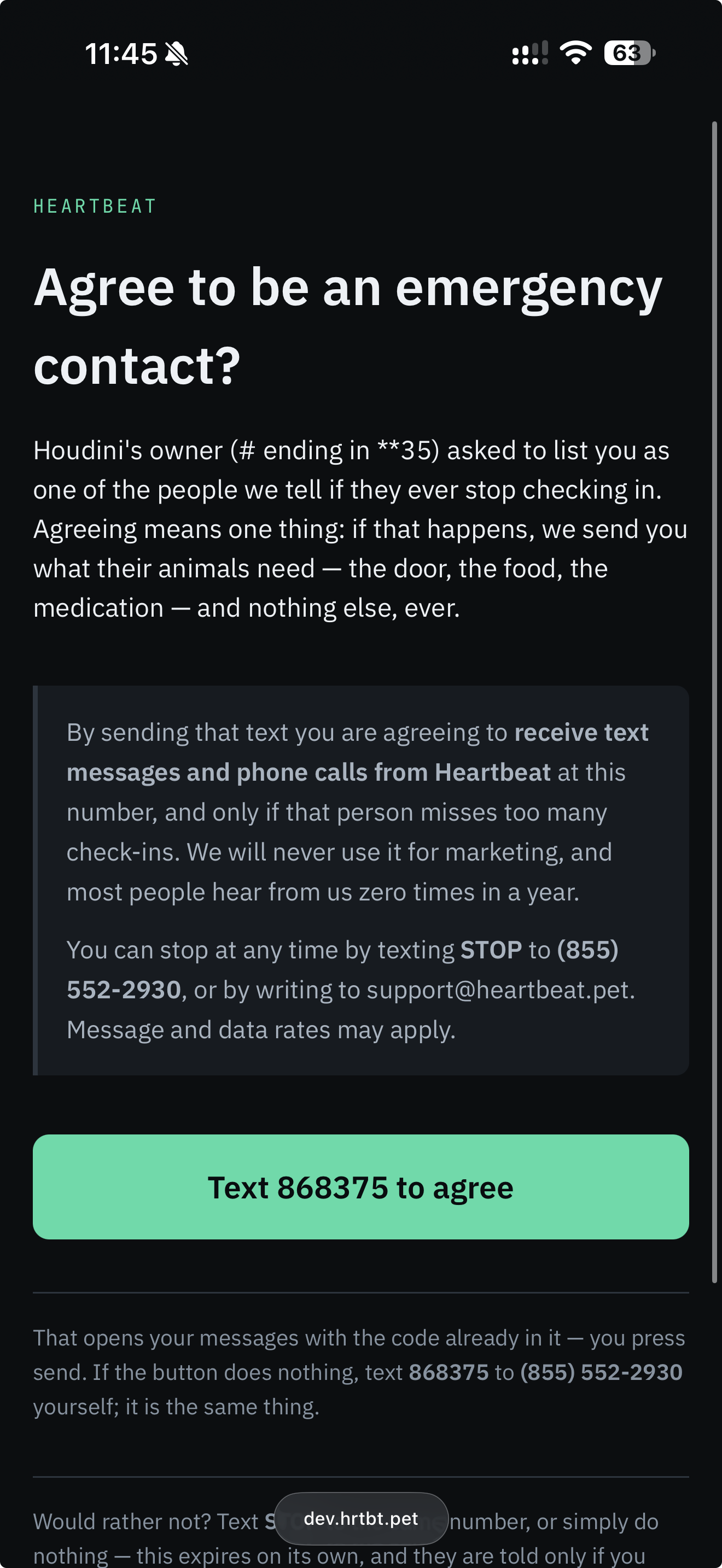
That page is published as an example, so it can be read rather than taken on trust — the same component, the same consent wording, the same Terms and Privacy links, and the same live button. Only the names and the digits are invented: those digits are reserved, match no invitation, and add nobody. Texting them gets a reply saying exactly that.
Contacts reached by email — which is every contact of a free account, and any contact without a mobile number — get the same invitation as a page instead: the same disclosure, agreed with a button, refused with the button beside it. It is published as an example so anybody can read it before they are ever sent one.
Agreeing there agrees to email and nothing else. A button in an inbox proves that a link reached an address; it proves nothing about a phone number somebody typed in beside it, so those contacts are emailed and only emailed. A number is never texted or dialled until its own owner has texted us from it — two separate records, and the phone one has exactly one way to be written.
3 — we confirm, in words the user could not have written
This is the one message every opted-in contact receives, and it is the disclosure that matters. The ask in step 1 came from a person and that person can edit it; this comes from us and they cannot touch it — so “never marketing” and “here is how to stop” reach the contact as our commitment rather than as their friend’s paraphrase of it.
Heartbeat: You’re now listed as an emergency contact for Houdini’s owner (# ending in **35). You may receive a text or call from this number if they stop checking in. We never send marketing. Reply HELP for help, STOP to opt out. Msg & data rates may apply.
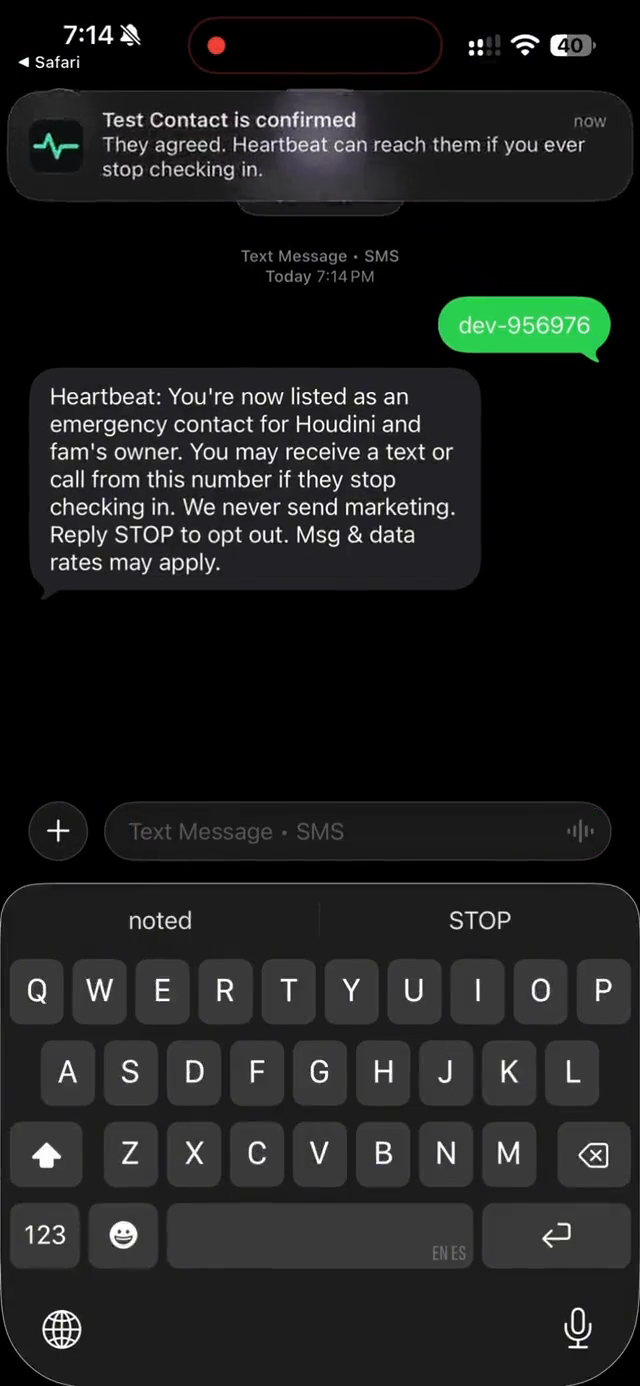
Both captures above come from our staging environment, and were taken while a single toll-free number still answered for staging and production together — which is what the dev- on the reply is: a prefix that selected which of the two should answer. Each environment has had its own number since, and that prefix is gone; a reply is the six digits alone. The short link reads dev.hrtbt.pet for the same reason. The wording of our confirmation, quoted above, is and was identical in both.
Declining is easier than agreeing, deliberately. Texting STOP or DECLINE refuses, and so does a button on the invitation page. Either one closes that number or address to every account, not only the one that asked: somebody who has said they would rather not be listed should not have to say it again to the next stranger who types their details in. Doing nothing also works — an invitation expires after 72 hours, cannot be reissued, and an unconfirmed contact is never messaged.
What a confirmed contact receives, and when
Nothing, until the user misses a check-in window and does not answer the reminders we send them first. A missed window opens an investigation during which we contact nobody but the user, and most end there. Only if that resolves nothing do we message their contacts. There is no schedule, no newsletter and no marketing. How often a contact hears from us depends on missed check-ins, and it may be never.
Heartbeat: Not an emergency. Can you check on Houdini within 1 hour? Houdini's owner (# ending in **35) has not checked in for 2 days. Reply Y if you can, or N if you cannot and we will ask another contact. Reply HELP for help, STOP to opt out. Msg & data rates may apply.

The user is a pronoun and not a name. “Houdini’s owner (# ending in **35)” is enough for somebody to recognise the person who asked them and no more than that. The closing sentence is added by the sender itself rather than written into each message, so no message can leave without it, and the plain hyphens are deliberate: a curly apostrophe puts the whole message outside GSM-7 and bills two segments as three.
The words that work
Every keyword Heartbeat acts on, in full. Case does not matter, and neither does spacing or punctuation — “Good boy!” and “goodboy” are the same answer. A keyword has to be the whole reply: “I’ll stop by tomorrow” is a sentence, not an opt-out, and is treated as one. The six-digit code is the exception and is read from anywhere in a message — but the words are then read from what is left, so STOP 123456 is an opt-out and not an opt-in.
- Opt in
There is no standing opt-in keyword. A word anybody can text at any time cannot say what is being agreed to, so no word agrees to anything here. Each opt-in is a unique six-digit code tied to one account holder, valid for 72 hours.
I ACCEPTACCEPTYESYOKOKAYSURECONFIRMAGREEBEGINSTARTGOOD BOYGOOD GIRLThese get one reply pointing at the digits, and nothing is recorded — somebody who answers “YES” in good faith deserves better than silence, but a word is not consent. A contact who texts an expired code gets one reply telling them to ask the person who invited them for a new one; we will not text a stranger to offer it.
- Opt out
NONSTOPSTOPALLENDDECLINEUNSUBSCRIBECANCELQUITLEAVENO MOREBAD BOYBAD GIRLEnds all messages to that number immediately and permanently, whether or not it had already confirmed, and across every account that lists it. The refusal is stored, the number is removed from every list it was on, and the app will not let a user ask it again. The user is told they were declined, never why.
- Checking in, for users
IM OKAYIM OKI AM OKAYI AM OKIM FINEI AM FINEIM ALIVEI AM ALIVECHECK INCHECKED INCHECKING INAnswers the reminder above and moves that account’s own deadline. Deliberately absent from the opt-in list: one number can be a user here and somebody else’s emergency contact, and “OK” means two different things to those two people.
- Answering the one question
YYESYEPYUPYEAHOKOKAYFINEALL GOODSays the user can be reached, or that the contact will go. Only meaningful in reply to the alert above, and only for the twenty-four hours after we send it: it answers that question and changes nothing about consent.
NNONOPENOT SUREUNSUREIDKDUNNONO IDEASays the contact is not sure — which is genuinely useful, because somebody who says nothing looks identical to somebody who never saw the message. While a question is open, N answers it rather than opting the number out. With no question open it means what it always meant, and
STOPand the carriers’ other words opt out in every case, always, without exception. On a call the same two answers are1and2— a call being the other channel a confirmed number buys, and one a paid account uses when a text has not been answered.- Help
HELPINFO?HEAD TILTSIDE EYEAnswered to any number, whether or not we have a record of it, because somebody who does not recognize the sender is owed an answer rather than silence. It identifies nobody: no user is named, and a reply from a number on no list reveals only who we are.
Heartbeat (heartbeat.pet) sends service texts about your Heartbeat account, a request from another Heartbeat user to ask you to be an emergency contact, or an incident after you agreed to be a contact. No marketing. Reply STOP to stop Heartbeat texts. Help: support@heartbeat.pet. Msg & data rates may apply.
- Undo an opt-out
STARTUNSTOPLifts a previous opt-out, and does nothing else. It does not put anybody back on a list: the user still has to ask again, and the contact still has to agree.
Frequency, removal and rates
- Frequency. Event-driven only. Nothing is scheduled and nothing is promotional. A user receives a verification code and window reminders; a contact receives one confirmation when they agree, then messages solely when a check-in has been missed — typically none at all.
- Not immediate, and never unrequested. Nothing reaches a contact until that contact has agreed from their own handset or their own inbox, the check-in window has closed, and the account holder has been asked first on every channel they have and has not answered. Most missed windows end there, with no contact messaged.
- One ask each, then the next person. A contact is asked once about a missed check-in; if they do not answer we move to the next contact rather than repeat. That one ask goes to every medium they approved, together — the address and the number were agreed to separately, and a single question delivered to both is one interaction, not two. What makes a second interaction is asking again, and the paragraph below is the only one this system allows.
- Each medium ends on its own, immediately. STOP to our number ends texts and calls to that handset, on every account that lists it, and the reply says so and says how to end email as well. The unsubscribe in any email ends email the same way. Neither one is taken as consent withdrawn from the other, because neither one was consent given to the other; anybody left with no open medium is removed from every list and cannot be re-added.
- Silence ends it too. A contact who is asked every time this service allows and never answers is paused on the media that were tried, until they opt in again. The owner is told. Nothing asks a fourth time to find out.
- A second ask needs their permission, and only exists when nobody is left. If the list runs out, the last person asked is asked whether we may try them once more, and a second message is sent only if they say yes — two asks, total, about one missed check-in.
- A third only on a paid account, only after everyone has gone silent. When the whole list has been asked and nobody has answered, a paid account sends one final round, spaced ninety seconds apart. That is a third ask at most. There is no fourth, at any price.
- Removal. A user can remove a contact at any time, and a contact can ask us directly at support@heartbeat.pet — without involving the user, and without having to text anything.
- Message and data rates may apply.
Opt-in proof
Everything above can be checked without taking our word for it.
- The consent page itself. heartbeat.pet/opt-in/example renders the same component a real invitation opens, with made-up names and its buttons inert. It is published so a reviewer — or anybody who has just been sent a link and is suspicious of it — can read the disclosure before agreeing to anything.
- The consent is inbound. It is not a claim we make on somebody’s behalf or a box we ticked for them. It arrives as a message from the contact’s own handset, so it exists in the carrier’s records as well as ours, and the moment it lands is stamped against that contact. A number that has not texted us is never messaged; a number that texted STOP is blocked from being asked a second time — both enforced by the application, not merely intended.
- The code is specific. What is stamped is not “somebody agreed” but which ask, on which account, they agreed to — and the message had to come from the number being added, so a user cannot produce their own contact’s consent.
- Agreement and a phone number are two records. Being a confirmed contact and being textable are stored separately, and the second can only be written by an inbound message from that number. So there is no sequence of events — no email accepted, no form filled in by the account holder — that ends with us texting a number whose owner has not texted us first.
- The disclosure is ours, not the user’s. The message that starts this is written by a person and editable by them, which is why nothing rests on it. What cannot be edited is the confirmation we send the moment their contact texts us: it states who we are, what may be sent, that it is never marketing, and the word that stops it. Every opted-in number holds that message, from us, sent before we have ever used the consent it describes.
- The messages above are quoted, not summarised. Every one of them is the text the sender actually composes — brand prefix, plain punctuation and opt-out line included — copied from the code that sends it and edited in the same change. A screenshot is an assertion about a message; these are the message.
Full policy: Privacy · Terms · support@heartbeat.pet